General
Scripts
Other
Pests & Visitors
Pests and Visitors are intermediary scripts for farming in the Garden. This guide explains various settings and how they work.
Shared Settings
Activate Instantly
The "Activate Instantly" setting will trigger the script as soon as pests spawn, even if you're still in the middle of farming. However, this feature cannot be used with all farm designs. It is meant for farms that are easily accessible for the script's pathfinder to return to any location. The script will fly back to where it left off after dealing with the pests.

The exception to this is if you enable "Use /setspawn For Intermediaries" in /taunahi -> Rewarper since this will use /setspawn for pests & visitors instead of flying out.
Pest Cleaner
Plot Travel Method
| Method | Description | Requires Garden Analysis |
|---|---|---|
| Flight (Slow) | Flies to each plot manually instead of teleporting. Much slower, but may look more legitimate. | No |
| Desk | Uses the /desk command to teleport to plots. | Yes |
| /tptoplot (Tab) | Uses the Tab widget to select a plot and teleports with /tptoplot. Faster than using Desk. | Yes |
If you use methods that require Garden Analysis, you'll need to run the "Garden Analyzer" script once during the initial setup. After running the analysis, you'll see which plots are teleportable in the Pest menu:

Pest Grinding
Pest grinding is a technique where we prioritise drops from killed pests, instead of money from actual farming, which (with the correct setup) will make more money. In 4.x we added optimisations to more scripts such as the Sugarcane (Classical), Mushroom (Classical) and Cactus.
Visitors
The visitor script teleports to the barn to check the visitor offers. Depending on your "Acceptance Filters" it will do one of three actions:
- Accept (Green)
- Ignore (Yellow)
- Reject (Red)
If it's accepted then it has successfully accepted the visitor and received the rewards. If it was ignored then the script wants to accept the visitor, but it cannot complete it itself, so it leaves it to you to deal with later. Some Visitors like "Spaceman" will always be ignored so you can handle them yourself.
FAQ
Scripts aren't activating automatically
If your scripts aren't activating at rewarp, check the following:
- Ensure you have a cookie active, and that you haven't disabled the widget/footer in Tab that indicates cookie status.

- Make sure you haven't disabled relevant widgets, such as the Visitor or Pest widgets:
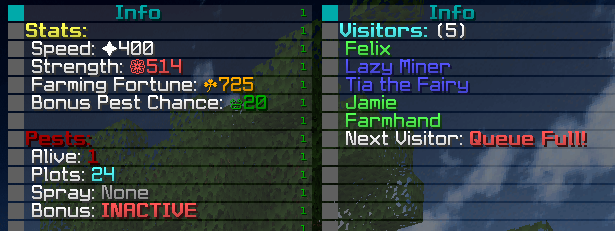
- You can also do /whynopest which may give you a reason to why pests or visitors wouldn't currently activate.
What if I get Spaceman?
If a visitor requests items that exceed your Max Spend Limit, or if the visitor is Spaceman, the script will ignore the request. You can decide what to do with these visitors manually.
How to speed up travel
By default, the script uses Flight (Slow), which doesn't require setup but is slow. To speed up travel, use one of the faster Plot Travel Methods described earlier. You can also enable Boost Efficiency, but keep in mind that this reduces the script's humanization.
Upgrading Vacuum
- Better Vacuum Tier: Purchasing a higher-tier Vacuum from SkyMart increases its range.
- Buzzing Reforge: Applying the Buzzing reforge and using 5x Bookworm's Favorite Book will enhance its damage to 600, allowing you to 1-tap pests.
Potential pathfinding issue
Taunahi uses various flying pathfinding methods, selecting the best one for each situation. However, rare pathfinding issues may occur, such as bad paths through areas with high tree density. In these cases, you can use the Plot Cleaner script to remove trees or report the issue on Discord.